Built by installers, for the people who keep crews moving.
Work orders, scheduling, dispatch, techs in the field, customer notices, invoices and tech pay. One place, from the first call to getting paid.
The Pivot is one complete system for a service company, not a patchwork of tools. Every job sits on the board that shows who owns the next step, and it moves to the next board on its own as the tech, the date or the work changes. Every job has the tech's yes: they accept an offer on their phone, say yes to your office, by phone, text or in person, or publish their hours so work inside them books itself. Techs who arrange their own day with the customer set the date themselves. Your desk sees a tech running behind before the customer calls, customers hear from your company's name at every step, and every invoice, payment and tech's pay lives on the same work order.
Built by a team in the field service business since 1996.
Getting a tech to the door is only half the job.
Most tools stop helping once the tech reaches the door. After that, pay goes on a spreadsheet, invoices sit for two weeks, and someone ends up retyping everything. That is where things slip.
We've lived that. In The Pivot, scheduling, dispatch, invoicing and tech pay all run from the same work order, so nothing gets retyped and nothing slips.
Everything a work order needs, in one place.
Six things your desk will notice on day one.
Techs say yes their way
Accept an offer on their phone, say yes to your office, or publish hours so work inside them books itself. Offer one job to several techs; the first yes wins.
Boards that move themselves
Change the tech, the date or the time, and the job lands on the right board. Nobody drags rows.
The right people, the right view
Owner, Admin, Dispatcher and tech, each with clear powers. Limit a desk login to certain techs and customers.
Live Map
Every site on an exact map point, with map buttons that open the spot in the phone's maps.
Late, before the call
A row turns violet with "Running behind" when the booked time has come and the tech hasn't tapped En route or On site. It turns red with "Late" when the arrival window ends and the tech still isn't On site.
The money, start to finish
Each customer COD or Invoiced, billed per job or weekly, with every payment recorded.
Getting the right tech out on a date they agreed to
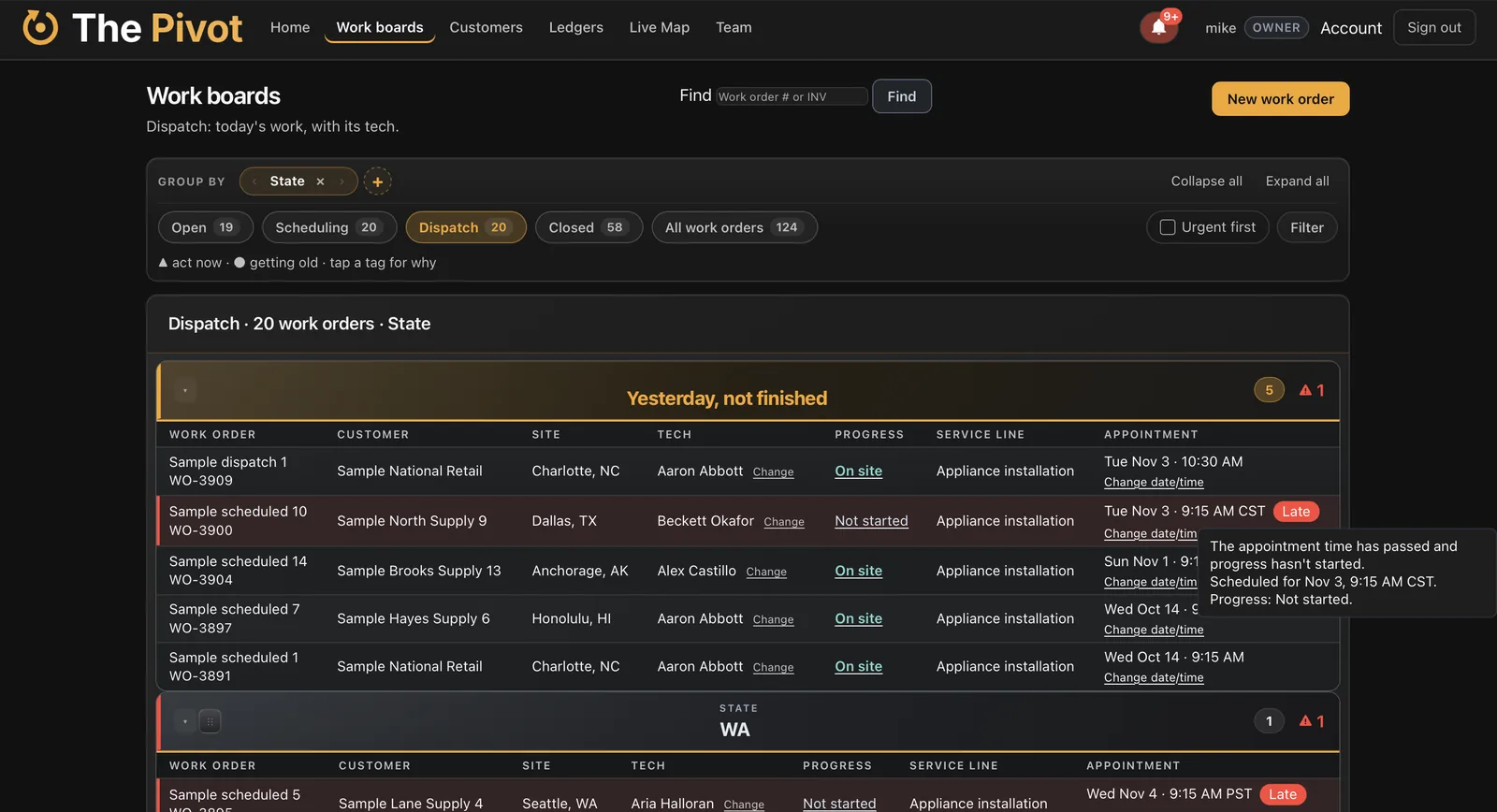
Dispatch board
- Jobs move to the right board by themselves. Open (no tech has the job yet; offers wait here), Scheduling (a tech has the job, with a day or waiting for one), Dispatch (today's work, until it's done) and Closed (the field work is done), with All showing everything. Change the tech, the date or the time, and the job moves on its own. At midnight, the day's booked work moves to Dispatch together.
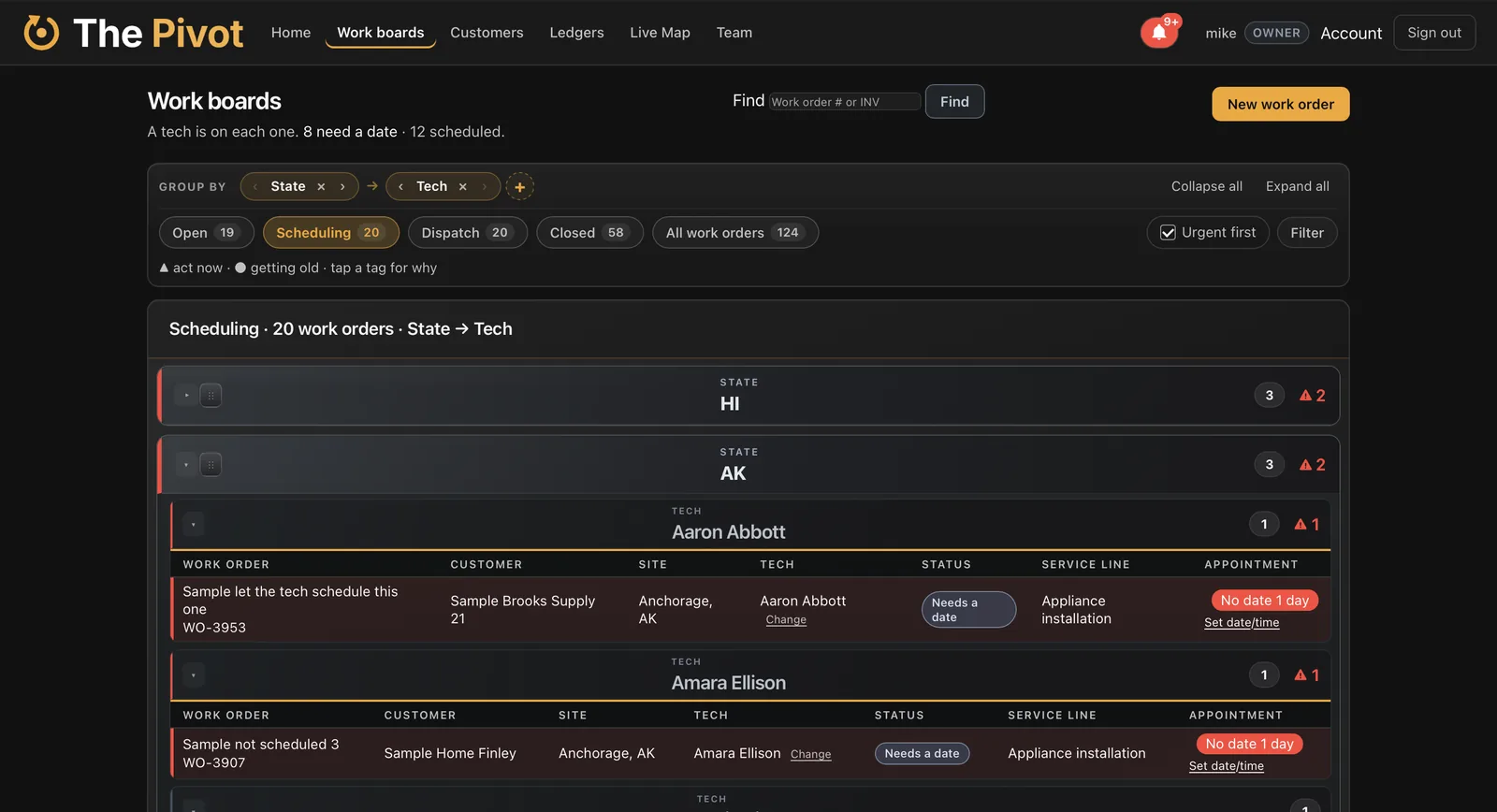
- Nest it your way. Group a board by state, tech or customer, and drag whole nests so what matters sits on top.
- See who fits. For each job, The Pivot puts the best fits on top: who has the skills, equipment and papers it needs, who's free, and who's nearest, with the customer's preferred tech first. Your desk picks with one click.
- Every tech works their own way. Some publish their hours, and work inside them books right in. Some set the day with the customer themselves. Any tech can take offers, or say yes to your office by phone, text or in person.
- Two colors, one meaning each. Red means act now. Violet means it's getting old. No color means it's fine. Yesterday's unfinished work stays at the top of Dispatch under a red heading until someone deals with it. A job of several days joins it only if it's still open after its last day.
- Deadlines you can see. A work order can carry a Complete by date, and the board warns you when it's near and nothing is booked.
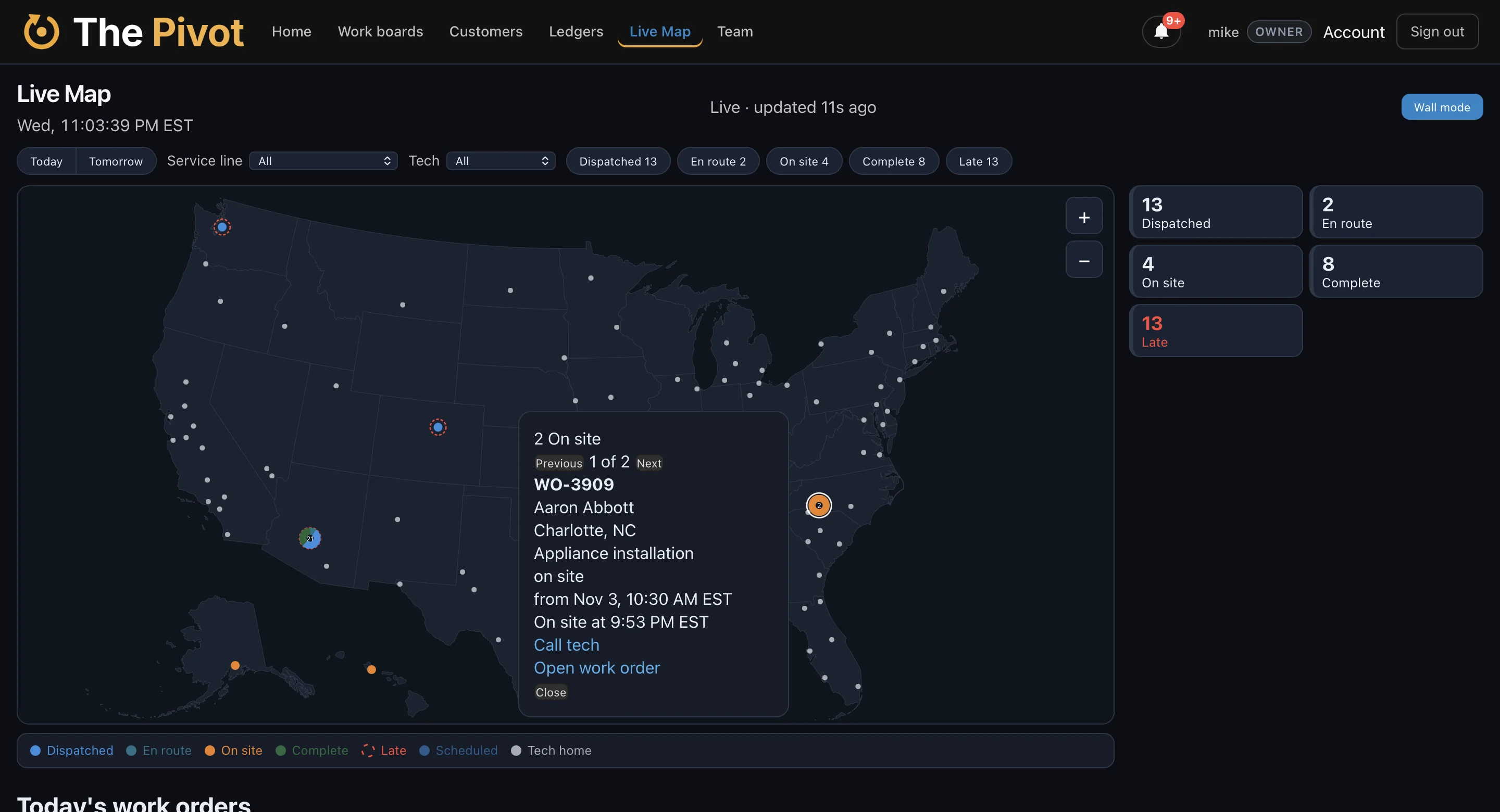
Live Map
- Exact map points. Sites get exact map points, and map buttons open the spot in the phone's maps.
- Loud when it can't find a place. A site address that can't be found shows as "Address not located".
- A tech's home stays private. Other techs and customers never see where a tech lives. The Dispatch Desk sees a tech's address by role.
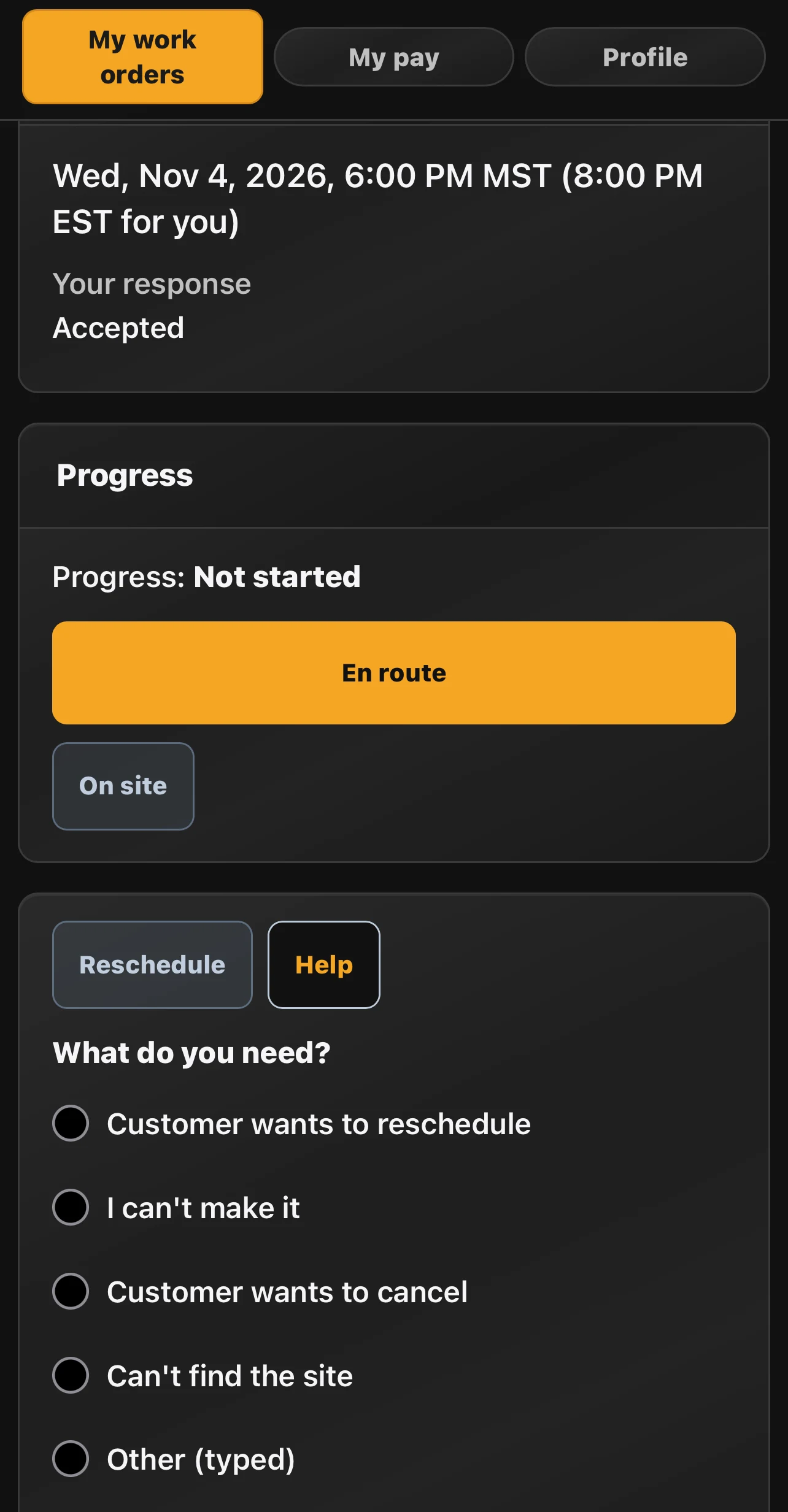
Tech phone page
- An offer they can judge. City, state, ZIP, the work, when, what to bring and their pay. The street and the customer come after they accept.
- Told plainly. A tech taken off a job is told not to go, by email and on the page, and a new address on a job they said yes to is emailed to them.
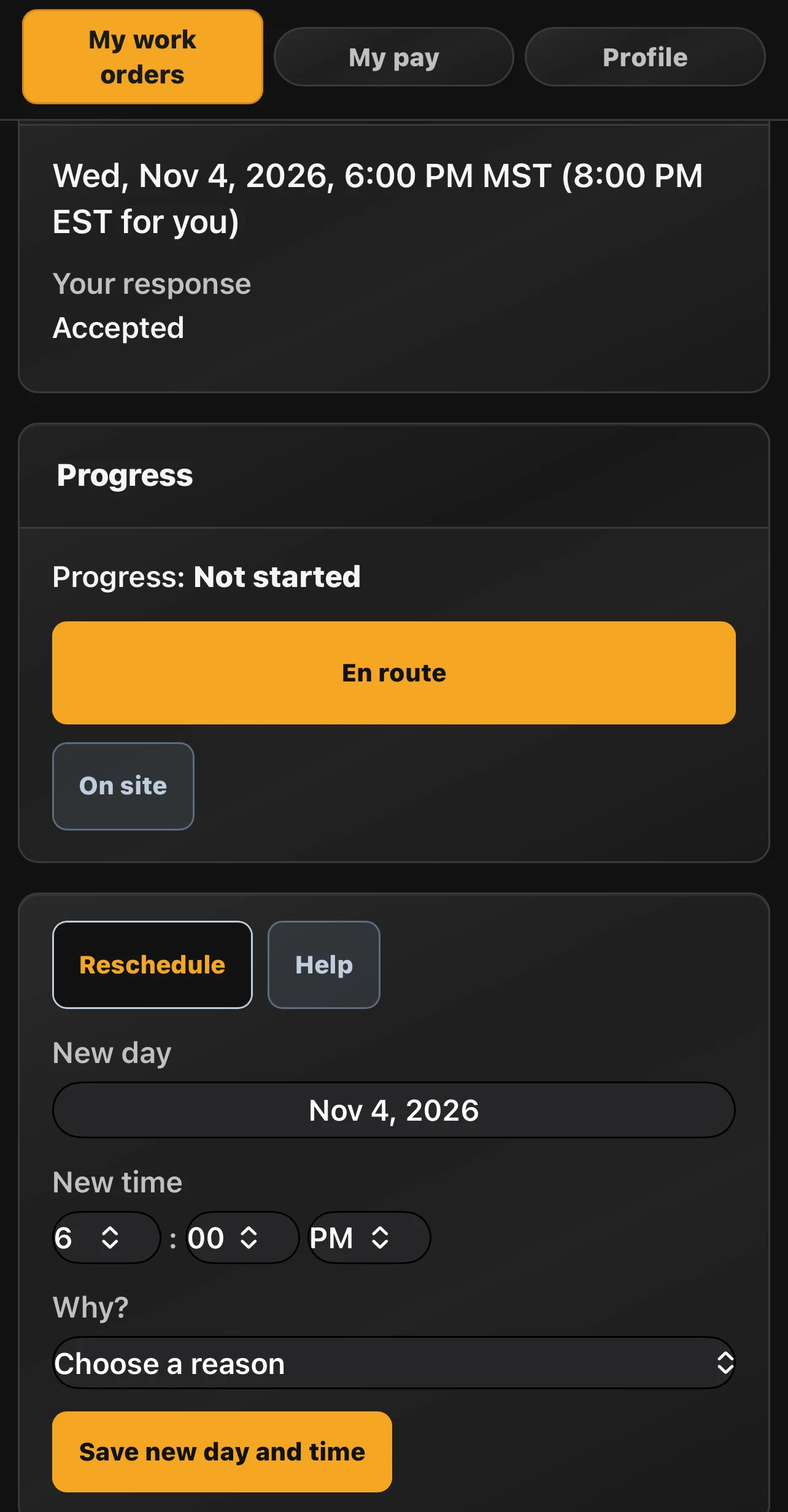
- Their own phone page. Techs tap En route, On site and Complete as they go, and Help from the Dispatch Desk is one tap away before they're on site.
- A signature on site. When a Customer signature is required, it's part of Complete. The Owner sets the company default, and each customer's setting can override it. Work completed without a required signature is held until an Owner, or an Admin allowed to, releases it.
Getting paid and keeping track of it
Invoicing and tech pay
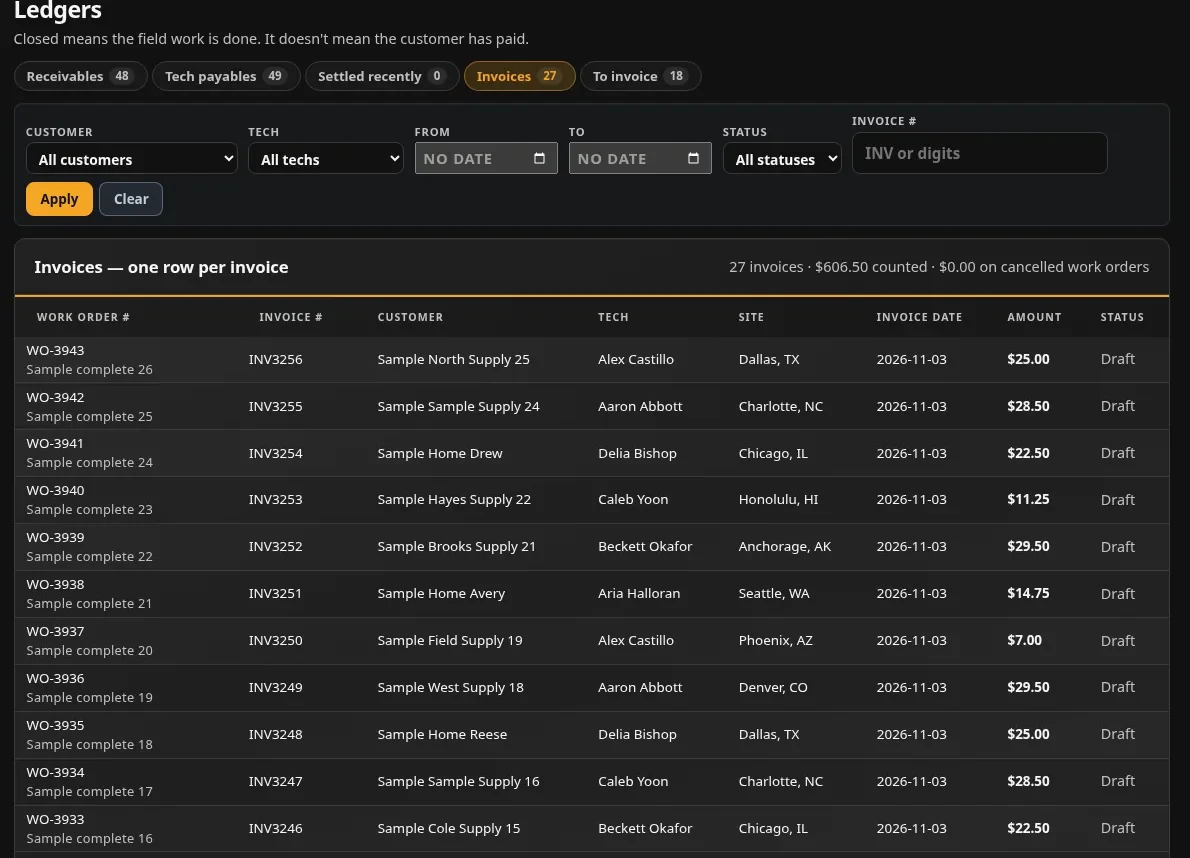
- Billed the way each customer is set. Each customer is COD or Invoiced, billed one invoice per work order or weekly. An invoice gets its number and dates when it's issued.
- Every payment on the record. Amount, date, how, and a reference, including part payments. Correct a sent invoice when you need to.
- Tech pay that fills itself in. Each tech's pay comes from their grade's percent of what that customer pays, rounded to the nearest fifty cents, with trip pay when a trip doesn't finish and extra mileage pay beyond a tech's coverage.
- Pay techs on your schedule. You set how often techs are paid; weekly is recommended.
- See what every job made. Each work order shows what it billed, tech pay, other costs, and what's left.
- Four roles on one ladder. Owner, Admin, Dispatcher and tech. Each role sets up only the roles below it, and a short list of "Can …" switches turns on for one person at a time.
- Pay stays private. A Dispatcher sees and changes a tech's pay only with Can change tech pay. Techs see their own pay on each offer and work order.
- You decide how strict. Set each rule Tight or Relaxed. Relaxed asks fewer questions, but The Pivot still records everything.
Two colors. One meaning each.
Red means act now. Violet means it's getting old. No color means it's fine. When two clocks fire, the worse color wins, and the other reason is still written in the hover. The colors only show. Nothing moves or cancels by itself.
Arrival clocks are one pair among many, next to Complete by, no tech, offered work, on hold and more. "Running behind" when the booked time has come and the tech has tapped neither En route nor On site. "Late" when the arrival window ends and the tech isn't On site (En route does not stop it). Yesterday's unfinished work sits under a red heading at the top until someone deals with it. A job of several days joins it only if it's still open after its last day.
A day with The Pivot
Three people, one work order. Example people, sample day.
Dana's morning
- She opens the boards and clears red first, then violet.
- At the top of Dispatch, "Yesterday, not finished" waits until she completes, cancels or reschedules it.
- She offers a job to several techs. The first yes wins.
- She books today's gaps, answers Tom, and keeps customers told in the company's own name.
Tom's day
- An offer arrives: city, ZIP, the work, when, what to bring and his pay. No street or customer until he accepts.
- He reads the Work details, then taps Accept.
- He taps En route, On site, then Complete. Before On site, Help from the Dispatch Desk is one tap away.
- On a job of several days he taps En route and On site each morning, and Complete once, when the whole job is done.
Renae's visit
- She hears from the company's own name when the visit is first set: Confirmed.
- The evening before, she gets a notice, then another the morning of.
- If the visit moves, she's told it Changed.
- When the work is done, she gets Complete. Every visit email has a stop link.
Promises The Pivot keeps for you
Every job has the tech's yes.
They accept an offer, say yes to your office, by phone, text or in person, or publish their hours so work inside them books itself. Techs who arrange their own day with the customer set the date themselves. How the yes was given is on the record.
Relaxed asks less. It never records less.
Ask fewer questions if you like. The history, the audit and what everyone was told stay complete.
Completed work is locked.
Tech, date, time and status stay locked until an Owner or Admin reopens it, and only before invoicing and payment.
Unfinished work never hides.
Yesterday's unfinished work stays at the top of Dispatch until someone completes, cancels or reschedules it. A job of several days joins that list only if it's still open after its last day.
Hard lines need the Owner.
Only the Owner overrides a missing credential or a Do not send, with a typed reason that stays in the audit.
Built by a team that's worked the field and built the tech.
Our team has been in the business since 1996, bringing field service, final-mile delivery and installation work together with deep experience building software. We've seen techs stuck at locked gates and invoices sitting in spreadsheets while crews waited to get paid, and we know what it takes to build systems that hold up under real work.
The Pivot came out of that mix: software shaped by people who have had to make the field day work.
Your customers stay yours.
Your work orders, customers, techs and rates belong to you, and they're kept separate from every other company's.
- Each login sees only what its role allows, and a desk login can be limited to certain techs and customers.
- Every work order and every person keeps a permanent history.
- Two-factor sign-in, HTTPS on every page, and encrypted nightly backups.
Show us how you work.
Tell us how your work orders run today, and we'll walk you through The Pivot with sample data set up the way you'd use it.